My Stocks Portfolio
- 4.8
- Rating
- 1.00M
- Installs
- Free
- Price

 Analysis by App-foxy
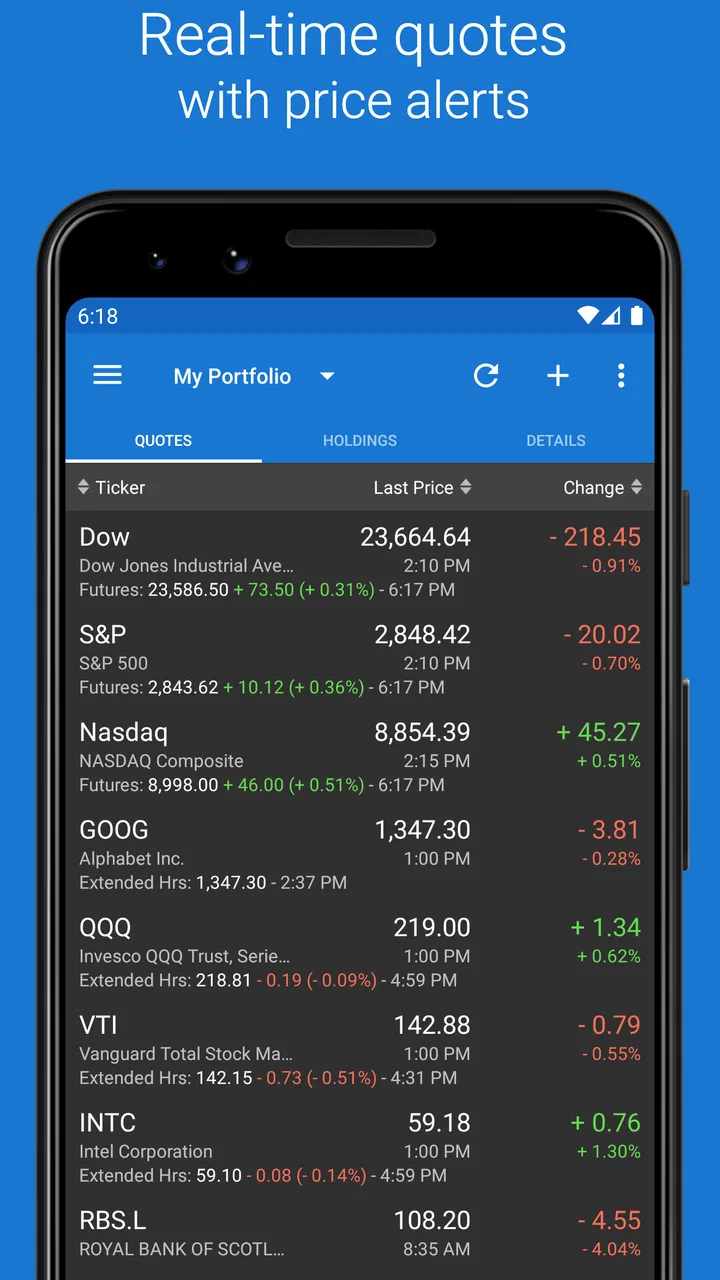
When I want a clear view of several investments without opening a full trading platform, I prefer a focused portfolio tracker. My Stocks Portfolio, developed by Peeksoft: Stock Market & Investing, takes that approach on Android by putting stocks, crypto holdings, portfolio views, and price alerts in one finance app. I spent time using it as a monitoring tool rather than treating it like a complete brokerage account, and that distinction matters: its value is in helping me watch markets and organize information, not in replacing every service connected to buying and selling assets.
The app is free to install and suitable for Everyone, with optional in-app purchases ranging from a few dollars to higher-priced items. It has been available since June 27, 2014, and its current version is 2.1123. Those details help explain why it feels like a mature utility rather than a fashionable finance experiment. It has reached over a million installs, with an average rating of 4.8 from roughly forty-one thousand ratings and about eight thousand written reviews. I would still judge it by my own workflow, but that level of adoption makes it easier to see why people keep it around.
How quickly it works during an ordinary market check
The first thing I notice with a portfolio app is not the number of charts. It is how quickly I can answer a simple question: what changed, and which holding needs attention? My Stocks Portfolio is strongest when I use it for that short check. I can open the watchlist or portfolio view, scan prices, and move on without navigating through the broader research and trading menus found in large broker apps.
You May Also Like

 Blood Strike: 2.5 Anniversary
Blood Strike’s Loadouts Turn Every Drop Into a Tactical Gamble
A close look at Blood Strike’s custom loadouts: how fast access to signature weapons reshapes its battle royale rhythm, rewards preparation, and narrows the gap between fights.

 Pandora - Music & Podcasts
Pandora’s Music Is Easy to Start, but Harder to Recover
Pandora’s strength is its low-effort path from a seed to a station. Its weak spot is how much confidence it asks you to place in connection, setup, and quiet recovery.

 8 Ball Pool
 Is Built on Rivalries, Rematches, and Routine
A close look at the rivalries, rematches, shared routines, and unanswered safety questions that turn a quick pool match into a persistent mobile community.

 Samsung Music
’s Quiet Strength Is Playing What You Already Own
Its reach comes less from spectacle than from dependable access to a personal library. That simplicity is both the app’s strongest retention engine and its ceiling.

 AccuWeather: Weather Radar
AccuWeather Review: A Quick, Clear Forecast for Everyday Decisions
For everyday plans, the best forecast is the one you can understand quickly. AccuWeather makes rain timing, radar, and local conditions easy to act on, with a few trade-offs.

 Hill Climb Racing
Why Hill Climb Racing Still Turns Crashes Into One More Run
A tiny car, a bumpy hill and one more upgrade: Hill Climb Racing keeps resurfacing because its simple chaos makes every near-miss feel personal.
More From Our News Desk



That focused design generally makes the experience feel light during normal use. Switching between a stock list, a crypto watchlist, and an alert-related view is more direct than opening a full investing platform with news feeds, order tickets, educational material, and account administration. If my goal is simply to check whether a position has moved enough to deserve a closer look, the app does not make me work through unnecessary screens.
There is an important difference between perceived speed and market freshness, however. A quick interface does not automatically mean that every displayed quote is suitable for immediate trading decisions. I would use the app to monitor and organize my interests, then verify time-sensitive information through the relevant market or brokerage service before placing an order. This is especially important when a price alert could prompt an action but the actual execution environment is elsewhere.
The app is also more useful when I prepare it around decisions I already make. Instead of adding every symbol that catches my attention, I would create a compact list for long-term holdings, another for companies I am researching, and a separate group for crypto assets if those belong in my routine. That separation reduces visual noise and makes the opening check faster. The non-obvious benefit is not a hidden speed trick; it is that a carefully designed list prevents me from spending time interpreting a crowded screen.
Why alerts can save time, and where they need discipline
Price alerts are one of the most practical parts of the app for me. They change the routine from repeatedly refreshing a screen to waiting for a level that matters. For example, if I am watching a company before deciding whether to research it further, I can set an alert around a price area that makes the next review worthwhile. I am not using the notification as an automatic buy signal. I am using it as a reminder to reopen the information and reconsider the situation.
This workflow is particularly helpful for people who follow markets around a job or family schedule. A person who checks investments during a lunch break does not need a finance terminal running constantly. A short list plus carefully chosen alerts can provide a calmer routine. The trade-off is that alerts only help when I define them thoughtfully. Too many thresholds turn a useful reminder system into background noise, while thresholds chosen without a clear reason encourage impulsive reactions.
I would also avoid treating an alert as a guarantee that an opportunity will remain available. Markets can move quickly, and an alert is a notification feature, not a promise of a particular execution price. That limitation is easy to overlook when an app makes monitoring feel simple. The best use is to create a prompt for investigation, not to outsource judgment.
What happens when the workload becomes heavier
Light monitoring is not the same as intensive analysis. My Stocks Portfolio is a better fit for keeping track of selected assets than for replacing a desktop research setup. When I add a large number of symbols, compare many categories, or repeatedly jump between portfolio information and detailed market research, the convenience of a compact mobile tracker naturally becomes less obvious.
Heavy use also changes how I think about resource demands. A finance app that shows lists and alerts is not doing the same job as a charting workstation with multiple live panels. I would expect a phone-based tracker to be most comfortable when it supports short sessions: open it, review the important movements, inspect a relevant asset, and close it. Keeping it open while constantly checking every market is less attractive, both for attention and for the practical limits of a mobile device.
My advice is to separate monitoring from analysis. I use the app to maintain a shortlist and notice movement. When I need to understand a company deeply, compare financial information, or make a trade through an account, I switch to a service designed for that specific task. This division keeps the portfolio tracker responsive in spirit and prevents it from being judged against tools with a completely different purpose.
A realistic everyday scenario shows where it fits. Imagine that I own a few shares, follow two companies I might research, and keep an eye on a crypto asset. Before work, I open the app and review the main portfolio list. During the day, I do not repeatedly search for each symbol because the relevant items are already grouped. If an alert arrives, I treat it as a prompt to read more and check my brokerage account, rather than rushing into a transaction. In the evening, I remove any alert that no longer reflects my plan. That routine uses the app as a filter for attention, which is more sustainable than trying to make it my entire financial command center.
Managing information without making the phone do too much
One of the more useful trade-offs is the balance between breadth and restraint. Because the app covers both stocks and crypto, it can become a single place for assets that I otherwise track separately. That is convenient, but it can also encourage me to build an oversized watchlist. I get better results when each symbol has a reason to be there: an existing holding, a planned research subject, or a specific alert condition.
I would review the list periodically rather than letting old interests accumulate. Removing inactive ideas has two benefits. It makes visual scanning faster, and it reduces the chance that I mistake an old watch item for a current priority. This is a small habit, but it is more valuable than adding another screen to the workflow.
People who want extensive news, advanced technical studies, direct order execution, or detailed financial research may find this approach too narrow. A brokerage app is usually the better choice when the main task is managing an account and submitting trades. A dedicated charting service may be preferable for technical analysis. My Stocks Portfolio makes more sense beside those tools, not necessarily instead of them.
Reliability, recovery, and what I would trust it to do
For a finance tracker, reliability includes more than whether the app opens. I want my lists to remain understandable, my alerts to be easy to review, and the app to help me recover from ordinary interruptions. The mature release history and broad user base give me confidence that this is an established utility, but I still keep my own records and avoid making the app the only place where I know what I own.
That backup mindset is important because a portfolio tracker and a brokerage account serve different roles. I would not rely on a watchlist as proof of ownership, nor would I use a displayed value as a substitute for account statements. If my phone is unavailable, if I change devices, or if I need an official transaction record, the broker or account provider remains the authority. The app is most reliable when I ask it to monitor information rather than serve as the legal or operational source of my assets.
Recovery is also easier when I keep the setup simple. I would take note of the groups and alerts that matter instead of building a complicated structure that I could not recreate. A short written record of my important symbols and alert logic is sensible for any monitoring tool. It also protects me from a common user mistake: forgetting why an alert exists and then reacting to it without context.
The app’s high average rating suggests that many people find its core experience dependable, but ratings cannot tell me whether every device, network condition, or market situation will behave identically. I look for reliability in the way I use it: can I return to the same concise overview, understand what deserves attention, and move to a more authoritative service when money is actually at stake? On those terms, it works well as a companion.
Handling interruptions and changing routines
Mobile finance use is full of interruptions. I may open a portfolio while commuting, receive an alert while busy, or start checking one holding and then get pulled into another task. The app is best suited to this fragmented pattern because its purpose is easy to resume: return to the list, inspect the relevant movement, and stop when the question is answered.
Still, I would not build a strategy around constant notifications. Alerts can make a phone feel urgent even when no action is justified. My preferred recovery process is simple: identify which asset triggered the notice, check whether the alert still matches my original plan, verify the broader context elsewhere, and only then decide whether anything has changed. That process turns the app into a useful checkpoint rather than an emotional trigger.
For anyone sharing a device, lending a phone, or using a work handset, I would also think carefully about where sensitive financial context appears. The app is designed for finance tracking, so even a list of symbols can reveal interests or holdings. I would use the device’s normal security practices and avoid assuming that a convenient tracker should replace the privacy controls of a dedicated financial account.
Device limits and the right expectations for Android users
The stated minimum operating system is Android 7.0, which makes the app accessible to a wide range of Android phones. That broad compatibility is useful if I am keeping an older device for basic finance monitoring. It also means I should not confuse compatibility with identical performance. A newer phone may feel more comfortable when I maintain larger lists or move rapidly between screens, while an older device may be better served by a restrained setup.
Resource demands are easiest to manage through behavior. I would avoid turning the app into a permanent market dashboard if I only need a few checks each day. I would also keep the portfolio focused and remove alerts that no longer serve a purpose. These habits reduce clutter and make the app feel more responsive, regardless of whether the phone is new or several years old.
Network conditions deserve similar caution. A mobile tracker depends on current information being available, but a weak connection can make any finance app feel slower or less reassuring. If I am in a place with unreliable service, I would treat what is already visible as a reference and postpone decisions that depend on the latest information. The correct response to uncertainty is not repeated tapping; it is verification when a dependable connection is available.
The free entry point makes experimentation easy, but the optional purchases deserve attention before I commit to a paid workflow. The listed purchase range runs from $2.99 to $149.99 per item, so I would check exactly what an upgrade provides and whether it solves a problem I actually have. A casual user who only wants a compact watchlist may not need to pay. Someone who depends on additional convenience may see value, but should decide based on the specific feature rather than the general promise of a larger package.
Who will appreciate it, and who should choose something else
I would recommend My Stocks Portfolio to a person who wants a dedicated, uncomplicated way to follow stocks, portfolios, crypto, and price alerts. It is especially suitable for someone who already has a brokerage account but dislikes opening that account every time they want a quick overview. It can also suit a beginner who is learning to organize a watchlist, provided that the beginner understands that tracking prices is not the same as researching investments or executing trades.
I would be more cautious recommending it to an active trader, a researcher who needs deep company information, or anyone looking for one app to handle every part of investing. Those users may be better served by a broker with integrated orders and account records, or by a research platform with richer analytical tools. The app’s strength is focus, and focus becomes a limitation when I ask it to perform a broader job.
It is also not the best choice for someone who wants to avoid thinking about portfolio organization. The app can display the assets I choose, but I still need to decide what belongs in each list, which alerts matter, and when to remove outdated items. That small amount of maintenance is worthwhile, yet it means the experience is not completely hands-off.
My performance verdict after using it as a monitoring companion
My Stocks Portfolio feels most convincing when I judge it by speed of access, not by the number of advanced tools it might replace. It gets me to a focused view quickly, supports a practical alert-based routine, and covers stocks and crypto without forcing me into a full brokerage workflow. The Android 7.0 minimum also keeps it approachable for people using older phones, while the free starting price lowers the barrier to testing it.
Its limits are equally clear. I would not use it as my sole source for official holdings, as a substitute for a broker, or as a complete research terminal. Larger watchlists and more demanding sessions can reduce the benefit of its focused design, and alerts require judgment to avoid turning normal market movement into constant pressure. Optional purchases also mean that I would inspect the upgrade details before spending, especially because the available purchase levels extend well beyond a casual one-time experiment.
The best reason to install it is simple: it turns scattered market-checking into a manageable routine without pretending to be the whole investment process. I would keep the lists short, use alerts as prompts rather than instructions, verify important information before acting, and maintain official records elsewhere. With those expectations, this free finance app from Peeksoft: Stock Market & Investing is a sensible companion for everyday monitoring and a poor replacement for specialized trading or research tools.
FAQs for My Stocks Portfolio
01What is My Stocks Portfolio, and what can I use it for?
My Stocks Portfolio is a finance app designed to help you monitor investments, organize stock holdings, and follow portfolio performance from one place. After adding your positions, you can review values, gains and losses, dividend information, and market movements. It is useful for investors who want a convenient overview without constantly checking each company separately.
02Does My Stocks Portfolio provide real-time stock prices?
The availability and speed of price updates can depend on the market, exchange, data provider, and the app’s selected settings. Some instruments may update in real time, while others can be delayed or refreshed periodically. Before relying on the displayed figures for a trade, compare them with your broker or official exchange, especially during volatile market conditions.
03Can I track different types of investments in My Stocks Portfolio?
The app is primarily intended for tracking stocks, but supported instruments may also include ETFs, funds, cryptocurrencies, or other assets depending on the version and market database. You generally need to enter the correct ticker, quantity, purchase price, and transaction details. Availability can vary by country and exchange, so check your specific assets after installation.
04Is My Stocks Portfolio connected directly to my brokerage account?
My Stocks Portfolio should be treated mainly as a portfolio-monitoring tool rather than a replacement for a brokerage platform. Depending on the version, you may need to add transactions manually or import portfolio information instead of authorizing direct trading access. It is important to verify whether your broker is supported and never share sensitive banking credentials unless the connection is clearly official and secure.
05Is My Stocks Portfolio suitable for making investment decisions?
My Stocks Portfolio can make it easier to organize holdings, review performance, and follow market information, but it does not remove investment risk or guarantee accurate predictions. The app should be used for tracking and analysis rather than as personalized financial advice. Confirm prices, corporate actions, taxes, and transaction records independently before buying or selling any investment.
Pros
- Clean interface makes it easy to monitor multiple investments.
- Supports custom portfolios for organizing different strategies.
- Useful performance charts help track gains and losses over time.
- Provides quick access to stock prices and portfolio values.
- Good option for investors who prefer manual portfolio tracking.
Cons
- Some market data may be delayed depending on the selected exchange.
- Manual transactions can become tedious for portfolios with frequent trades.
- Advanced analysis tools may be limited compared with professional platforms.
- Exchange coverage and features may vary by region.
- Portfolio results depend on accurate data entry and transaction details.

My Stocks Portfolio
Gallery